Megan Hamilton
Megan Hamilton
senior product designer
senior product designer
ezCater · 2026
ezCater · 2026
Saving Enterprise admins time and effort, and bringing company strategy to life with the first self-serve integration
Saving Enterprise admins time and effort, and bringing company strategy to life with the first self-serve integration
My role: product design lead
Team: PM, 3 engineers, content designer, researcher, marketer, SAP Concur external partner
Platform: desktop web, some mobile web, emails
Duration: 7 months
My role: product design lead
Team: PM, 3 engineers, content designer, researcher, marketer, SAP Concur external partner
Platform: desktop web, some mobile web, emails
Duration: 7 months
Problem to solve
For Enterprise companies, enforcing expense management practices and keeping user rosters up to date is a hassle.
Winning Enterprise customers by offering integrations at scale
My team knew from recent research that integrations with expense management and user management products (like SAP Concur) were one of the top 5 factors influencing prospective customers’ food program choice.
SAP Concur as a strategic starting point
66% of ezCater’s top 250 enterprise accounts use SAP Concur for expense management, but we had only 10% of orderers in these accounts using the existing individual Concur integration, representing a huge opportunity.
Moving from an existing individual integration with gaps to a new Enterprise solution
ezCater had an existing Concur integration, letting people who order food forward receipts to streamline their reimbursement process. However, this integration had notable weaknesses, outlined below.
Targeting Enterprise customers by offering integrations at scale
ezCater pivoted to attract and retain enterprise customers, and we knew from recent qualitative research that integrations with expense management and user management products (like SAP Concur) were one of the top 5 factors influencing prospective customers’ food program choice.
SAP Concur as a strategic starting point
66% of ezCater’s top 250 enterprise accounts use SAP Concur for expense management, but we had only 10% of orderers in these accounts using the existing individual Concur integration, representing a huge opportunity. A key competitor (Uber for Business) recently launched an enterprise integration with SAP Concur, and we wanted to protect our business with our own integration.
Moving from an existing SAP Concur integration with gaps to a new Enterprise solution
ezCater had an existing integration with SAP Concur, letting individuals who order food forward receipts to streamline their reimbursement process. However, the existing integration had notable weaknesses, outlined below. Our team set out to build the first self-serve Enterprise integration for admins to connect to SAP Concur at the account level, letting admins automatically forward receipts for 1,000+ users at all times.
Current state: problems to solve for
Current state: problems to solve for

Not optimized for scale: each individual (non-admin) user must connect on their own
Poor findability: integration located in not-often visited page
No ability to manage users
Outdated tech & design patterns, bugs
Not optimized for scale: each individual (non-admin) user must connect on their own
Poor findability: integration located in not-often visited page
No ability to manage users
Outdated tech & design patterns, bugs
My goal:
Design an Enterprise integration between ezCater and SAP Concur, enabling ezCater enterprise admins to forward receipts for all orders, as well as sync desired users from SAP Concur to ezCater.
My goal:
Design an Enterprise integration between ezCater and SAP Concur, enabling ezCater enterprise admins to forward receipts for all orders, as well as sync desired users from SAP Concur to ezCater.
Discovery
Synthesizing many inputs into a clear experience plan, and forming a point of view instead of copying the status quo
Starting with draft requirements, illuminating paths and edge cases with my team
I wove together key inputs and insights from various sources to plan the work to be done. Once I mapped out key flows and emerging questions, my team and I discussed how the integration mechanics would work. As a result, we aligned on important edge cases and unhappy paths, alongside the happy path of the ezCater admin easily connecting the integration in a few moments.

Start
End C
End A
End B
Alternate start
The Admin portal flow alone (shown above) ultimately contained 2 different entry points, 3 ending points and various unhappy paths and error states. By mapping things out with my PM and engineers early, I prevented surprises in design and engineering LOE down the road.
The Admin portal flow alone (shown above) ultimately contained 2 different entry points, 3 ending points and various unhappy paths and error states. By mapping things out with my PM and engineers early, I prevented surprises in design and engineering LOE down the road.
Enterprise food orderer
Enterprise food orderer
ezCater support team
ezCater support team


Enterprise Admin
Enterprise Admin
Let me connect my organization’s Concur and ezCater accounts, so that it’s easier to manage my team and get expenses done
Make it clear why I should connect to the Enterprise integration even if I have the personal Concur integration active
Let me connect my organization’s Concur and ezCater accounts, so that it’s easier to manage my team and get expenses done
Make it clear why I should connect to the Enterprise integration even if I have the personal Concur integration active
Depending on whether I had the personal Concur integration active - reassure me that my receipts are being sent to Concur, or let me continue to set up the personal integration on my own
Depending on whether I had the personal Concur integration active - reassure me that my receipts are being sent to Concur, or let me continue to set up the personal integration on my own
Let me quickly reference important details about each customer, including the status of their enterprise and/or personal Concur integration
Let me quickly reference important details about each customer, including the status of their enterprise and/or personal Concur integration
primary user

Identifying, grappling with and solving for 15+ “Concur conundrums”
While planning for 3 user groups’ needs, I solved for unique scenarios and edge cases stemming from the multi-layered nature of this project. This was a group effort - my PM, engineers, content designer and I had many whiteboarding sessions on the various “Concur conundrums” as we called the numerous “what about” scenarios.
For example: how should we communicate that the Enterprise integration is connected, to a non-admin user who used to use the personal Concur integration, to reassure them that their receipts are still being sent to Concur but it's not something they can control anymore? I flagged this as important to solve for, since we didn't want to create mistrust and confusion leading to user complaints or lower order volume.
4 factors added complexity to our work:
Identifying, grappling with and solving for 15+ “Concur conundrums”
While planning for 3 user groups’ needs, I solved for unique scenarios and edge cases stemming from the multi-layered nature of this project. This was a group effort - my PM, engineers, content designer and I had many whiteboarding sessions on the various “Concur conundrums” as we called the numerous “what about” scenarios.
For example: how should we communicate that the Enterprise integration is connected, to a non-admin user who used to use the personal Concur integration, to reassure them that their receipts are still being sent to Concur but it's not something they can control anymore? I flagged this as important to solve for, since we didn't want to create mistrust and confusion leading to user complaints or lower order volume.
4 factors added complexity to our work:

Ripple effect through admin portal touchpoints

Solving for parent-child accounts

Flows involve an external product (Concur login, app store)

Coexistence of individual
and Enterprise integrations
Taking a competitor's integration as inspiration, but not a perfect playbook
Uber's Concur integration was a major influence on our work, since it was the only comparable integration on the market. My content designer and I found certain aspects of the UX helpful and relevant but also identified anti-patterns that we would not want to copy into our experience. I used inputs from our prior Concur research, general design best practices and inspiration from Uber (as well as other B2B software like Vanta) to design an experience that is clear and lightweight as possible for admins and orderers alike.
Taking a competitor's integration as inspiration, but not a perfect playbook
Uber's Concur integration was a major influence on our work, since it was the only comparable integration on the market. My content designer and I found certain aspects of the UX helpful and relevant but also identified anti-patterns that we would not want to copy into our experience. I used inputs from our prior Concur research, general design best practices and inspiration from Uber (as well as other B2B software like Vanta) to design an experience that is clear and lightweight as possible for admins and orderers alike.

Inspiration
Give admins immediate confirmation via toast (especially for syncing users)
Inspiration
Give admins immediate confirmation via toast (especially for syncing users)
Anti-pattern
Hiding integrations in a tab in Settings page - not easy to find
Anti-pattern
Hiding integrations in a tab in Settings page - not easy to find
*Enhanced image resolution with Figma Make, since this is from Uber's documentation website - some visual artifacts
Ideation
Flaring on concepts and refining with team feedback
Sharing with my team early and often to refine recommendations
I explored design options for key moments in each flow with my content designer (this was especially crucial as user messaging was critical throughout the journeys), and workshopped my concepts and emerging preferences with input from cross-functional partners (primarily my PM, engineers, and marketing partner) on direction and feasibility.
This was the first integration that Enterprise admins would be able to see in the portal, so I explored design questions at a high level (Where should integrations live?) all the way down to micro-interactions (how and where should we communicate integration status?)
Sharing with my team early and often to refine recommendations
I explored design options for key moments in each flow with my content designer (this was especially crucial as user messaging was critical throughout the journeys), and workshopped my concepts and emerging preferences with input from cross-functional partners (primarily my PM, engineers, and marketing partner) on direction and feasibility.
This was the first integration that Enterprise admins would be able to see in the portal, so I explored design questions at a high level (Where should integrations live?) all the way down to micro-interactions (how and where should we communicate integration status?)
Example: How might we display integrations, inside the Admin portal?
Example: How might we display integrations, inside the Admin portal?
vs

Integrations
Concur Enterprise
Active
——————————————————————————————————————————
Learn more
Manage
Integration 2
Inactive
——————————————————————————————————————————
Learn more
Connect
Integration 3
Disabled
——————————————————————————————————————————
Learn more
Concur Enterprise
Active
——————————————————————————————————————————
Learn more
Manage
Integration 2
Inactive
——————————————————————————————————————————
Learn more
Connect
Integration 3
Disabled
——————————————————————————————————————————
Learn more
Concur Enterprise
Active
——————————————————————————————————————————
Learn more
Manage
Integration 2
Inactive
——————————————————————————————————————————
Learn more
Connect
Integration 3
Disabled
——————————————————————————————————————————
Learn more
Small cards / tiles
+ Matches Uber, Okta patterns - admins may be familiar from other tools
+ Can fit more integrations w/o requiring scroll
- Harder to scan
- Less room to indicate status, metadata once integration is connected
Open Q: How many integrations do we plan to launch as self-serve in the next year?
Integrations
Concur Enterprise
Active
——————————————————————————————————————————
Learn more
Manage
Integration 2
Active
——————————————————————————————————————————
Learn more
Manage
Integration 3
Inactive
——————————————————————————————————————————
Learn more
Connect
Integration 4
Disabled
——————————————————————————————————————————
Learn more
Integration 5
Active
——————————————————————————————————————————
Learn more
Manage
Horizontal cards
+ Easy to scan, even when integration statuses vary
+ More room to display important metadata, settings
+ Lends well to a future search / filter pattern once we have 10+ integrations available
- Will make admins scroll if there are 6+ integrations (can mitigate w/ search + filter)
Open Q: What statuses do we need to design for? Assuming connected, inactive, disabled, more?
Integrations
Concur Enterprise
Active
——————————————————————————————————————————
Learn more
Manage
Integration 2
Active
——————————————————————————————————————————
Learn more
Manage
Integration 3
Inactive
——————————————————————————————————————————
Learn more
Connect
Integration 4
Disabled
——————————————————————————————————————————
Learn more
Integration 5
Active
——————————————————————————————————————————
Learn more
Manage
Horizontal cards
+ Easy to scan, even when integration statuses vary
+ More room to display important metadata, settings
+ Lends well to a future search / filter pattern once we have 10+ integrations available
- Will make admins scroll if there are 6+ integrations (can mitigate w/ search + filter)
Open Q: What statuses do we need to design for? Assuming connected, inactive, disabled, more?
Recommendation
Sharing with my team early and often, along with getting feedback from peer designers in other domains, helped me sharpen my rationale and design feasibility.
Research
Balancing speed to launch with validating our solution
Using integration set-up calls as a scrappy learning opportunity
For our Beta rollout, my team's primary goal was to successfully connect the integration in live calls with our customers. I also wanted to make sure admins understood how to locate and manage the new integration, so I worked with my PM and our team’s researcher to turn the integration setup calls into hybrid probes on intuitiveness and unmet needs. We had considered sending a survey to admins about how the integration was working, but that would not be as helpful immediately after Beta release, and the information we wanted to learn was more likely to come from face-to-face conversation.
To make this happen, I drafted a question guide for my PM to use with customers, and we refined questions together. After each call, my team debriefed on how the setup went, along with key learnings and deciding what to do next. This helped my team build a muscle of collaborating quickly and sharing a sense of accomplishment as we met with customers and gained a perspective on what to deliver post-MVP.
Using integration set-up calls as a scrappy learning opportunity
For our Beta rollout, my team's primary goal was to successfully connect the integration in live calls with our customers. I also wanted to make sure admins understood how to locate and manage the new integration, so I worked with my PM and our team’s researcher to turn the integration setup calls into hybrid probes on intuitiveness and unmet needs. We had considered sending a survey to admins about how the integration was working, but that would not be as helpful immediately after Beta release, and the information we wanted to learn was more likely to come from face-to-face conversation.
To make this happen, I drafted a question guide for my PM to use with customers, and we refined questions together. After each call, my team debriefed on how the setup went, along with key learnings and deciding what to do next. This helped my team build a muscle of collaborating quickly and sharing a sense of accomplishment as we met with customers and gained a perspective on what to deliver post-MVP.
This was hard to influence because we couldn’t directly impact the Concur UX. We worked with our Marketing team to differentiate our landing pages for the personal and Enterprise integrations.
New follow-up project to give admins more control over bringing in users, with custom attributes from Concur
Actions
No changes: on standby for customer support requests if any admins do have issues connecting or managing the integration
Learnings
Validated core experience: Admins understood the value of the integration, and the new Integrations page location made sense to them.
Discovered unmet needs: 4 of 7 customers expressed concern about bringing in all their Concur users to ezCater - they wanted more control over which users they could import
Unexpected “Aha:” Concur admins typically did NOT already use ezCater - they were signing up to ezCater for the first time, to connect the integration. Concur admins also confused the personal and enterprise integrations, due to ambiguity in the Concur app store browsing UX.
Weaving AI into my process
Using AI tools to communicate concepts and interactions faster
Claude Design as a concept + prototyping partner
For our post-MVP follow-up project, I had an instinct from prior work that we’d need to create a complex form to provide custom user syncing as a capability. I used Claude Design to quickly create an interactive concept for the project kickoff, helping my PM and engineers visualize what the solution might look like with a rough sense of logic and interactions, early on. I also used Figma Make for early work, but found Claude's prototyping abilities to be faster and more accurate to our design system specifications.
Claude Design as a concept + prototyping partner
For our follow-up project, I had an instinct from prior work that we’d need to create a complex form to provide custom user syncing as a capability. I used Claude Design to quickly create an interactive concept for the project kickoff, helping my PM and engineers visualize what the solution might look like with a rough sense of logic and interactions, early on. I also used Figma Make for early work, but found Claude’s prototyping abilities to be superior.
Claude Design as a boost for engineering handoff
Later, once I had created specs in Figma and explored different interaction patterns for the custom syncing flow, I used Claude to create a prototype demonstrating the flow of the entire form, with all paths included. Using Claude let me communicate motion design and logic decisions much more quickly and easily than in Figma - my engineers especially found it helpful to grasp the design intent.
Claude Design as a boost for engineering handoff
Later, once I had created specs in Figma and explored different interaction patterns for the custom syncing flow, I used Claude to create a prototype demonstrating the flow of the entire form, with all paths included. Using Claude let me communicate motion design and logic decisions much more quickly and easily than in Figma - my engineers especially found it helpful to grasp the design intent.
Solution overview
I designed a clear, simple way to let ezCater Enterprise admins connect to SAP Concur, syncing hundreds of users and thousands of receipts without extra effort.
Key journey #1: Enterprise admin becomes aware of new integration, connects via ezCater admin portal and SAP Concur login
Key journey #1: Enterprise admin becomes aware of new integration, connects via ezCater admin portal and SAP Concur login
Key journey #2: Enterprise admin sets up custom user sync, to bring their desired users from SAP Concur into ezCater and streamline account management
Key journey #2: Enterprise admin sets up custom user sync, to bring their desired users from SAP Concur into ezCater and streamline account management
Design highlights & thinking behind the UIs
Design highlights & thinking behind the UIs

Logic behind the form flow: syncing users is an optional feature, and default sync is the simplest and least error-prone option. I designed the form to progressively reveal custom sync attributes only if an admin wants this feature.
Logic behind the form flow: syncing users is an optional feature, and default sync is the simplest and least error-prone option. I designed the form to progressively reveal custom sync attributes only if an admin wants this feature.
Attribute type
Cost center code
Accepted values
10243, 30495, 29127, 93450
Values are not case-sensitive and should be separated by commas.
Navigating a big constraint: we could not validate values in real time - ideally I wanted to give admins more feedback on how many Concur users match each value, to prevent errors. My workaround was emphasizing the need to coordinate with the Concur admin, in helper text, and providing a preview modal with the new team total size (this takes a few seconds to load, but I decided it’s worth it to reassure the admin, in discussion with my team.)
Navigating a big constraint: we could not validate values in real time - ideally I wanted to give admins more feedback on how many Concur users match each value, to prevent errors. My workaround was emphasizing the need to coordinate with the Concur admin, in helper text, and providing a preview modal with the new team total size (this takes a few seconds to load, but I decided it’s worth it to reassure the admin, in discussion with my team.)
Custom roster sync: what to expect
Syncing will add all US-based SAP Concur users with one or more of the selected attributes to your ezCater Enterprise account and send them an email invitation to join. Any current ezCater account members without one or more of the selected attributes will be removed from your account, but they will still be able to log in and access a personal ezCater account. Admins will not be removed.
Communicating a valuable but potentially destructive feature: Syncing users from Concur to ezCater is not easy to undo - it will kick out people who are not in the Concur team, and also blocks admins from adding people in ezCater manually while the sync is active. To make admins aware of this risk, I worked with my content designer to emphasize this in a banner and reiterate the message in the confirmation modal. We landed on communicating this information without overindexing on the risk, since ultimately this feature is useful and beneficial to admins.
Communicating a valuable but potentially destructive feature: Syncing users from Concur to ezCater is not easy to undo - it will kick out people who are not in the Concur team, and also blocks admins from adding people in ezCater manually while the sync is active. To make admins aware of this risk, I worked with my content designer to emphasize this in a banner and reiterate the message in the confirmation modal. We landed on communicating this information without overindexing on the risk, since ultimately this feature is useful and beneficial to admins.
Custom fields
Cost center code
Employee group
Expense policy
Invoice group
standard fields
City
Department name
Division name
Ledger code
Manager’s user ID
State
Facing unexpected ambiguity with the attribute dropdown: each Concur account can have completely custom attributes (typically 10-25 but up to 100s in rare cases), and my team didn’t have a clear read on which were most popular. Based on real setups from 2 Beta customers, we got signal that custom fields were more likely to be used vs default fields, so I recommended organizing the dropdown with all custom fields in a section, then standard fields, in alphabetical order. My engineer said this was feasible.
Facing unexpected ambiguity with the attribute dropdown: each Concur account can have completely custom attributes (typically 10-25 but up to 100s in rare cases), and my team didn’t have a clear read on which were most popular. Based on real setups from 2 Beta customers, we got signal that custom fields were more likely to be used vs default fields, so I recommended organizing the dropdown with all custom fields in a section, then standard fields, in alphabetical order. My engineer said this was feasible.
To completely deliver the E2E SAP Concur integration experience for admins, orderers and ezCater staff, here's the scope of work that I designed.
30+ screens across 3 product surfaces (Enterprise admin portal, various pages in the ezCater food marketplace product, and our internal dashboard), 90%+ desktop web with some mobile web UIs for Marketplace experiences
SAP Concur connection landing page, including login and error states - meeting SAP Concur's strict guidelines for partner integrations
15+ edge cases, including 5 variations for what the Concur integration looks like in the portal, for parent-child admin scenarios
Collaborated on 2 emails related to Concur settings updates
To completely deliver the E2E SAP Concur integration experience for admins, orderers and ezCater staff, here’s a sense of the scope of work that I designed.
30+ screens across 3 product surfaces, 90%+ desktop web with some mobile web UIs for Marketplace experiences
SAP Concur connection landing page, including login and error states - meeting SAP Concur’s strict guidelines for partner integrations
15+ edge cases, including 5 variations for what the Concur integration looks like in the portal, for parent-child admin scenarios
Collaborated on 2 emails related to Concur settings changing
Impact
We saved Enterprise admins time and effort, saw a 5%+ increase in bookings and laid the groundwork for future self-serve integrations.
5.67%
Increased order bookings in accounts using the integration, 1 month into Beta release
5.67%
Increased order bookings in accounts using the integration, 1 month into Beta release
15,000+
New ezCater orderers brought in via integration settings (user sync)
15,000+
New ezCater orderers brought in via integration settings (user sync)
5,000+
Receipts sent automatically to Concur, 1 month into Beta release
5,000+
Receipts sent automatically to Concur, 1 month into Beta release
Engineering input re: future work: “It was easy to build on the design patterns [from Concur] and scale.”
We brought in more new orderers than expected, via admins using custom and standard roster sync. This project also laid the foundation for bringing two other critical integrations (SSO, Procurement) into the Enterprise admin portal, to give admins the ability to request the integrations more easily and give them confidence on their current integration status.
Engineering input re: future work: “It was easy to build on the design patterns [from Concur] and scale.”
We brought in more new orderers than expected, via admins using custom and standard roster sync. This project also laid the foundation for bringing two other critical integrations (SSO, Procurement) into the Enterprise admin portal, to give admins the ability to request the integrations more easily and give them confidence on their current integration status.
Learnings and reflections
While we delivered a deceptively simple MVP, I want to revisit certain patterns as we scale up more self-serve integrations for admins.
How scalable is this pattern? Do admins need more context?
How scalable is this pattern? Do admins need more context?
Revisiting settings patterns with new integrations
As my team makes more integrations self-serve, something I want to reconsider is: how much context do admins need regarding disabled "always on" settings, when managing each integration? I’m curious how this will apply to the SSO integration (for example.) I landed on this recommendation to communicate what the SAP Concur integration does (and the setting cannot be turned off), but I want to make sure this doesn’t confuse or frustrate admins to see disabled settings without additional context.
The importance of seamless collaboration with Marketing for a coherent E2E experience
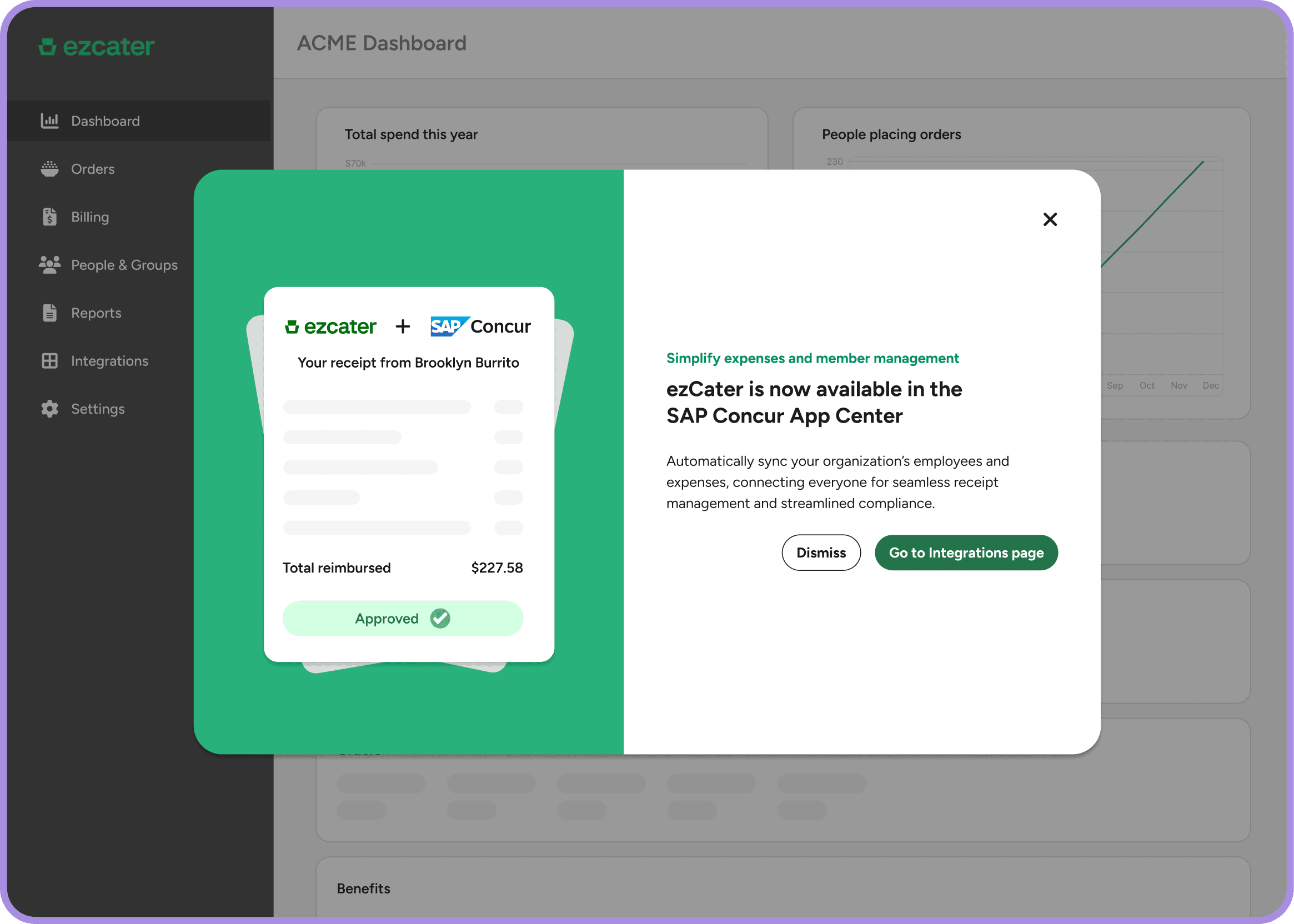
60% of ezCater admins only visit the Enterprise portal once a quarter, or less. Because of this, we needed to consider outbound communication to bring admins into the portal and connect the integration. I collaborated with the Marketing team and my content designer on banners and modal announcements inside the Portal as well as the main ezCater product (which admins visit more frequently.) Our marketing partner also drove an email campaign to attract more Beta customers, which was extremely helpful. While Marketing and Design are in different departments, customers don’t care about internal siloes - emails, banners, flows, it’s all part of a single customer experience.
Zooming out: standardizing portal patterns for admins and restaurant owners
Throughout this project, I consulted with a peer designer who was working on a dashboard product for a different ezCater user group (Restaurant owners.) While our users have different context and needs, we found that we had common patterns and approaches for portal structure, navigation and components. Sharing my thinking with this designer throughout the project helped me consider new ways to create the Concur settings form, and in the future I want to partner more formally on standardizing portal patterns and best practices within ezCater.
Revisiting patterns with new integrations
As my team makes more integrations self-serve, something I want to reconsider is - does it make sense to offer more disabled pre-set settings, when admins manage the integration? And what’s the most effective way to communicate this? I’m curious how this will apply to SSO (for example.) I landed on this recommendation to communicate what the SAP Concur integration does (and the setting cannot be turned off), but I want to make sure this doesn’t confuse or frustrate admins to see disabled settings without additional context.
The importance of seamless collaboration with Marketing
While the SAP Concur integration is powerful, 60% of ezCater admins visit the portal once a quarter. Because of this, we needed to consider outbound touchpoints and ways to make admins aware of the integration. I collaborated with the Marketing team and my content designer on banners and modal announcements inside the Portal as well as the main ezCater product (which admins visit more frequently.) Our marketing partner also drove an email campaign to attract more Beta customers, which was extremely helpful. While Marketing and Design are in different departments, customers don’t care about internal siloes - emails, banners, flows, it’s all part of a single customer experience.
Zooming out: standardizing portal patterns across different areas of the business
Throughout this project, I consulted with a peer designer who worked on a dashboard product for a different ezCater user group (Restaurant partners.) While our users have different context and needs, we found that we had common patterns and approaches for portal structure, navigation and components. Sharing my thinking with this designer throughout the project helped me consider new ways to create the Concur settings form, and in the future I want to partner more formally on standardizing portal patterns and best practices within ezCater.
Thanks for reading! See more of my work:
Thanks for reading!
See more of my work:
Interested in working together? Contact me on Linkedin.

Atlassian
2024
Reinventing the Confluence blank page experience
E2E design
Iterating post-MVP
Navigating constraints